Elevating CSAT Survey Experience to Improve Agent Performance
Elevating CSAT Survey Experience to Improve Agent Performance
Elevating CSAT Survey Experience to Improve Agent Performance
Scope
Scope
Survey Builder, Micro-Interaction, Competitive Analysis
Survey Builder, Micro-Interaction, Competitive Analysis
Micro-Interaction, Responsive Design, Competitive Analysis
Impact
Impact
Adopted by 20+ enterprise clients
Adopted by 20+ enterprise clients
Timeline
Timeline
Jan - Feb 2026
Jan - Feb 2026
The Starting Point
The Starting Point
Qiscus Helpdesk is an omnichannel ticketing system that helps businesses manage, prioritize, and resolve customer queries efficiently.
As the platform scaled, measuring agent performance became critical to keep resolution times fast. Direct customer feedback gives support teams the insights they need to continuously improve agents' performance.
Qiscus Helpdesk is an omnichannel ticketing system that helps businesses manage, prioritize, and resolve customer queries efficiently.
As the platform scaled, measuring agent performance became critical to keep resolution times fast. Direct customer feedback gives support teams the insights they need to continuously improve agents' performance.
Qiscus Helpdesk is an omnichannel ticketing system that helps businesses manage, prioritize, and resolve customer queries efficiently.
As the platform scaled, measuring agent performance became critical to keep resolution times fast. Direct customer feedback gives support teams the insights they need to continuously improve agents' performance.
Discovery
Benchmark of Art Commerce
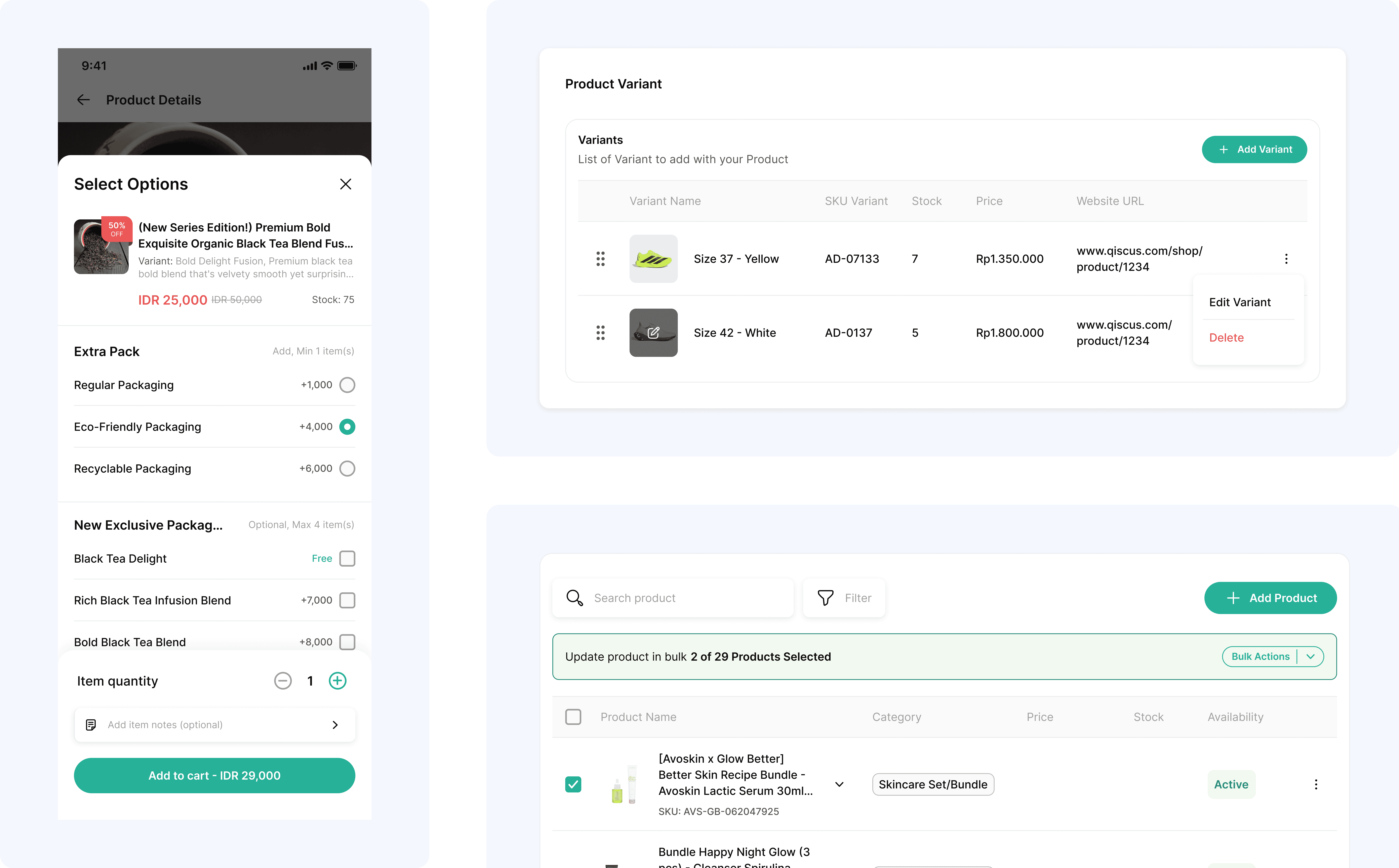
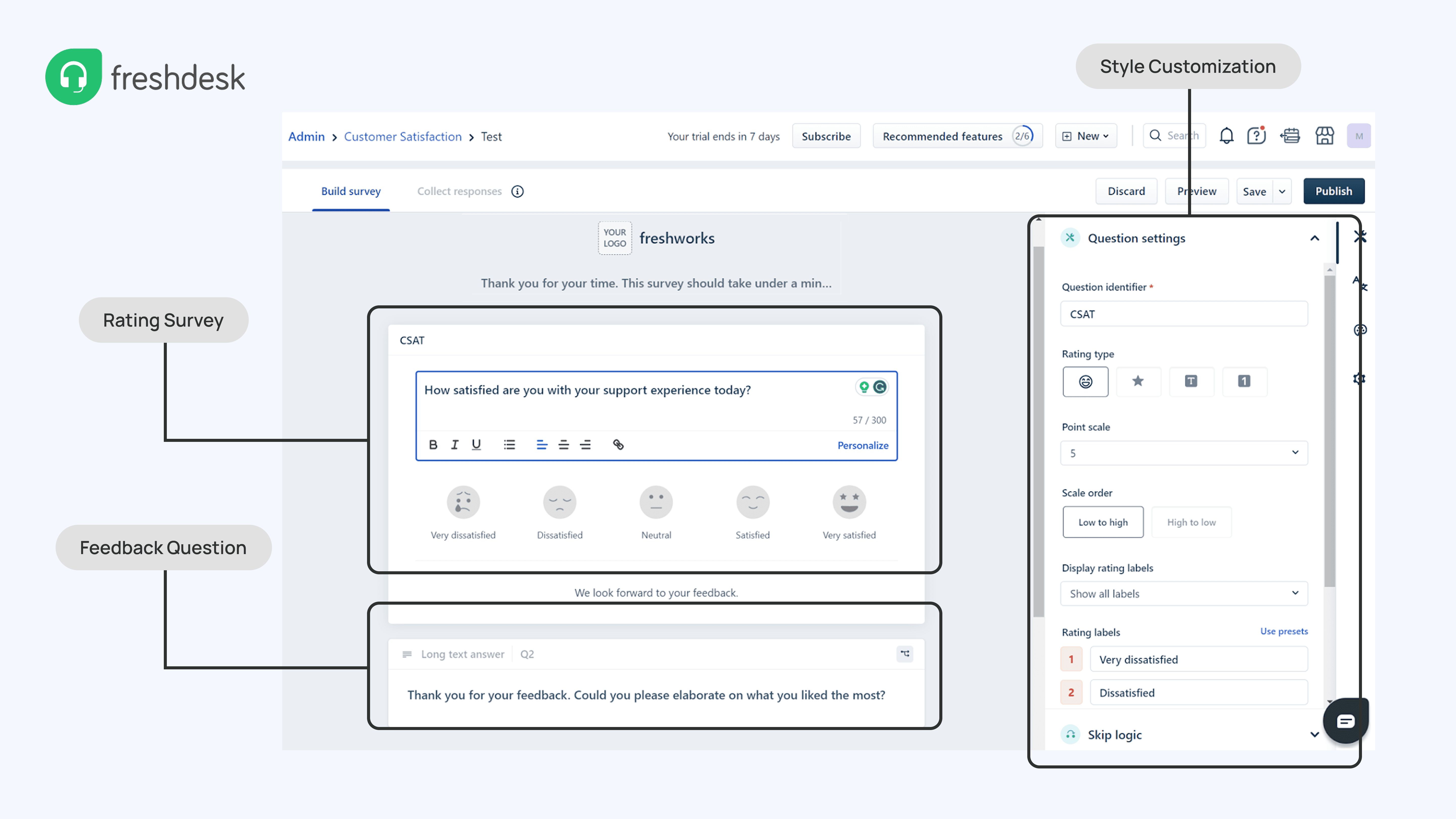
To understand industry standards, leading helpdesk platforms like Zendesk and Freshdesk provide flexible customization for survey content and question formats, while local platforms like Mekari Qontak take a simpler approach.
Despite the differences in complexity, these platforms keep the setup process simple to drive adoption and only trigger surveys after ticket resolution. This insight shaped our approach: build flexibility without sacrificing ease of use.
To understand industry standards, leading helpdesk platforms like Zendesk and Freshdesk provide flexible customization for survey content and question formats, while local platforms like Mekari Qontak take a simpler approach.
Despite the differences in complexity, these platforms keep the setup process simple to drive adoption and only trigger surveys after ticket resolution. This insight shaped our approach: build flexibility without sacrificing ease of use.
Understanding the Flow
Gaining Perspectives
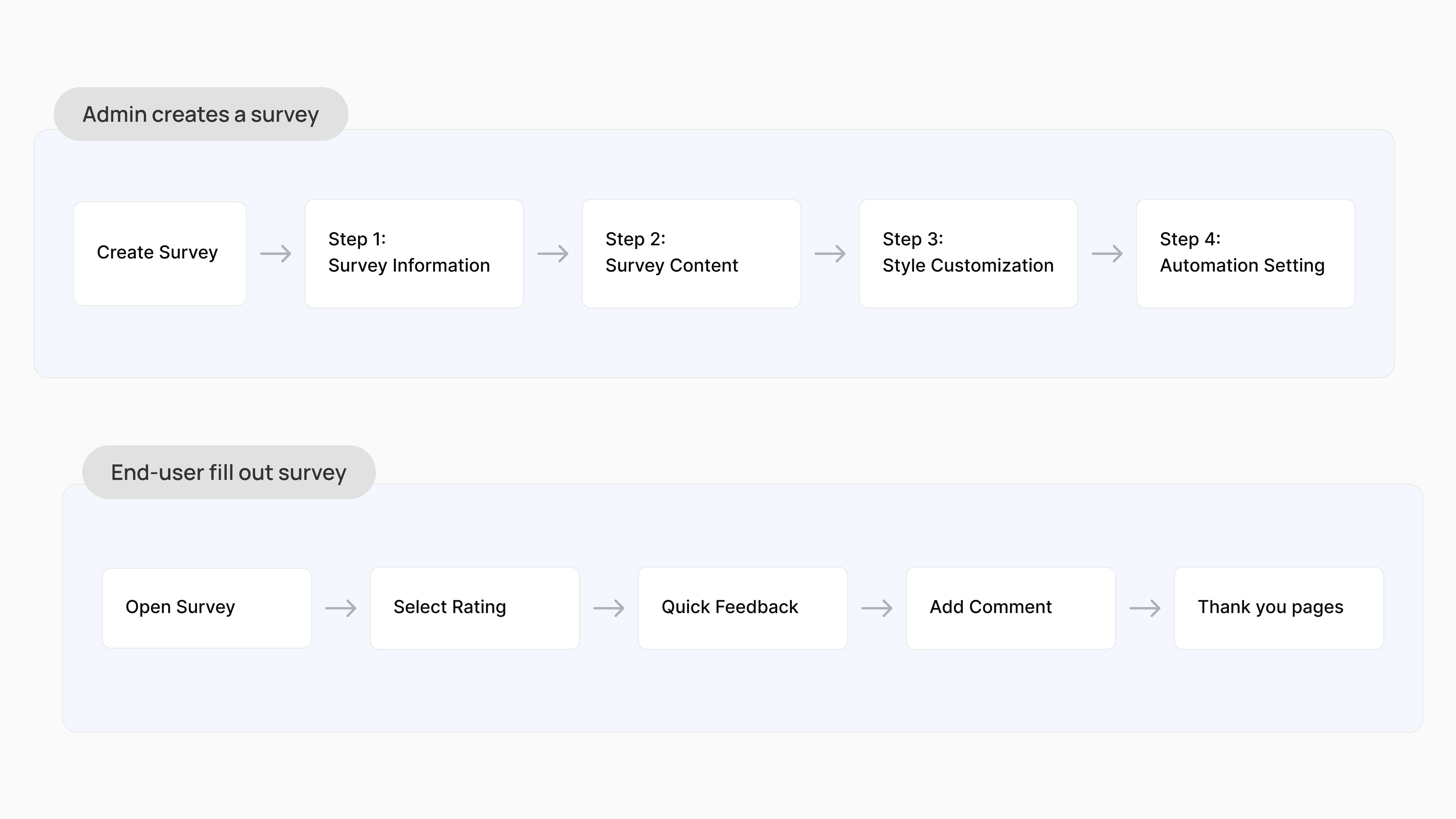
With that insight in mind, the flow is mapped around two different intentions. Admins need enough control to collect meaningful feedback, so the creation flow is structured to give teams flexibility across content and customization.
On the other hand, end-users just want to get it done. The response flow is deliberately kept short, so completing a survey should feel effortless.
With that insight in mind, the flow is mapped around two different intentions. Admins need enough control to collect meaningful feedback, so the creation flow is structured to give teams flexibility across content and customization.
On the other hand, end-users just want to get it done. The response flow is deliberately kept short, so completing a survey should feel effortless.
Crafting the Experience
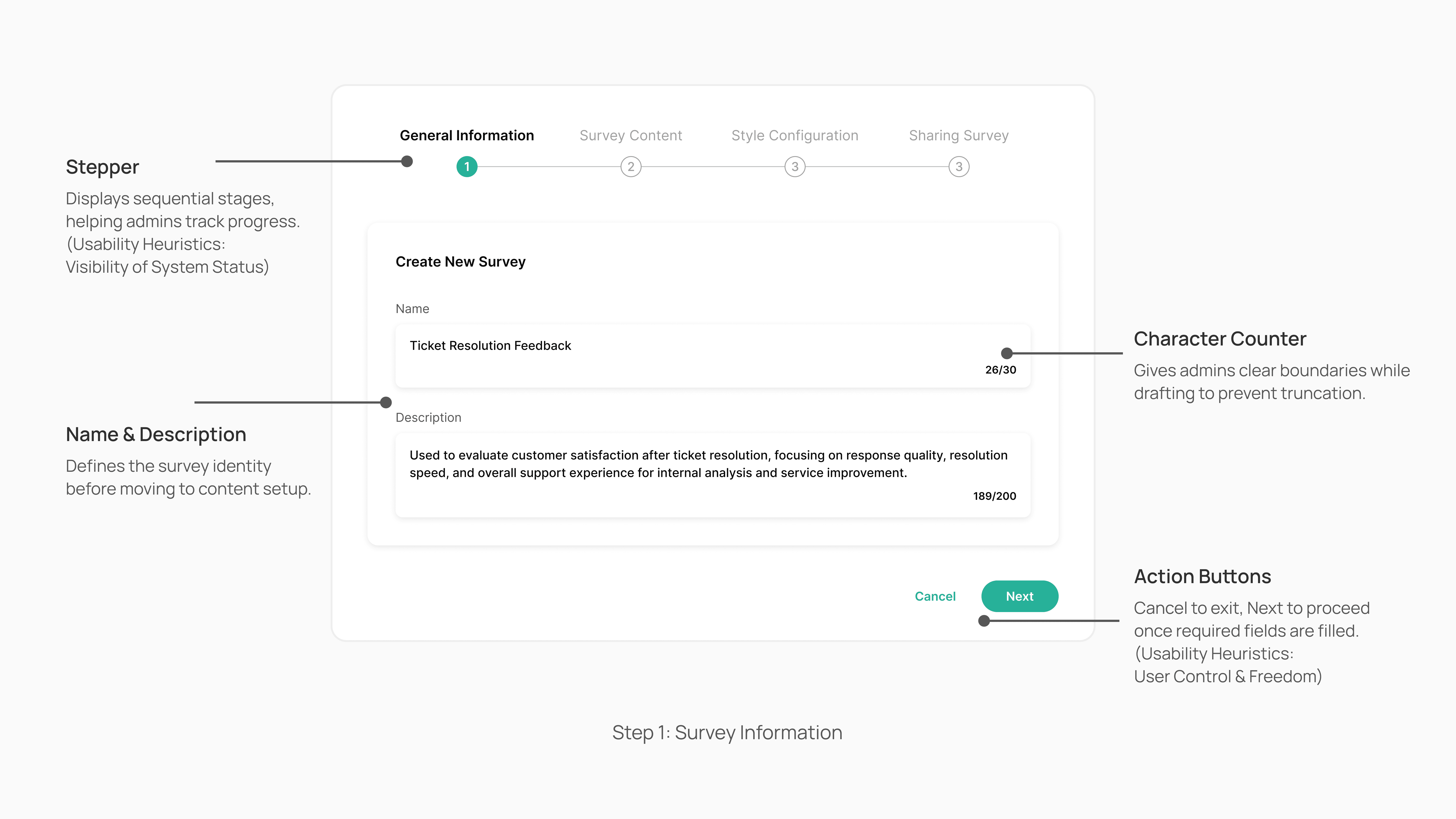
With the flow and intentions established, the design process began by focusing on what admins actually need to complete. Each step was approached as a standalone task to minimize cognitive load, then validated against Usability Heuristics to catch potential gaps early.
With the flow and intentions established, the design process began by focusing on what admins actually need to complete. Each step was approached as a standalone task to minimize cognitive load, then validated against Usability Heuristics to catch potential gaps early.
The first step keeps things focused. Admins only need to name the survey and add a short description before moving forward. The stepper, character counters, and action set clear boundaries
The first step keeps things focused. Admins only need to name the survey and add a short description before moving forward. The stepper, character counters, and action set clear boundaries
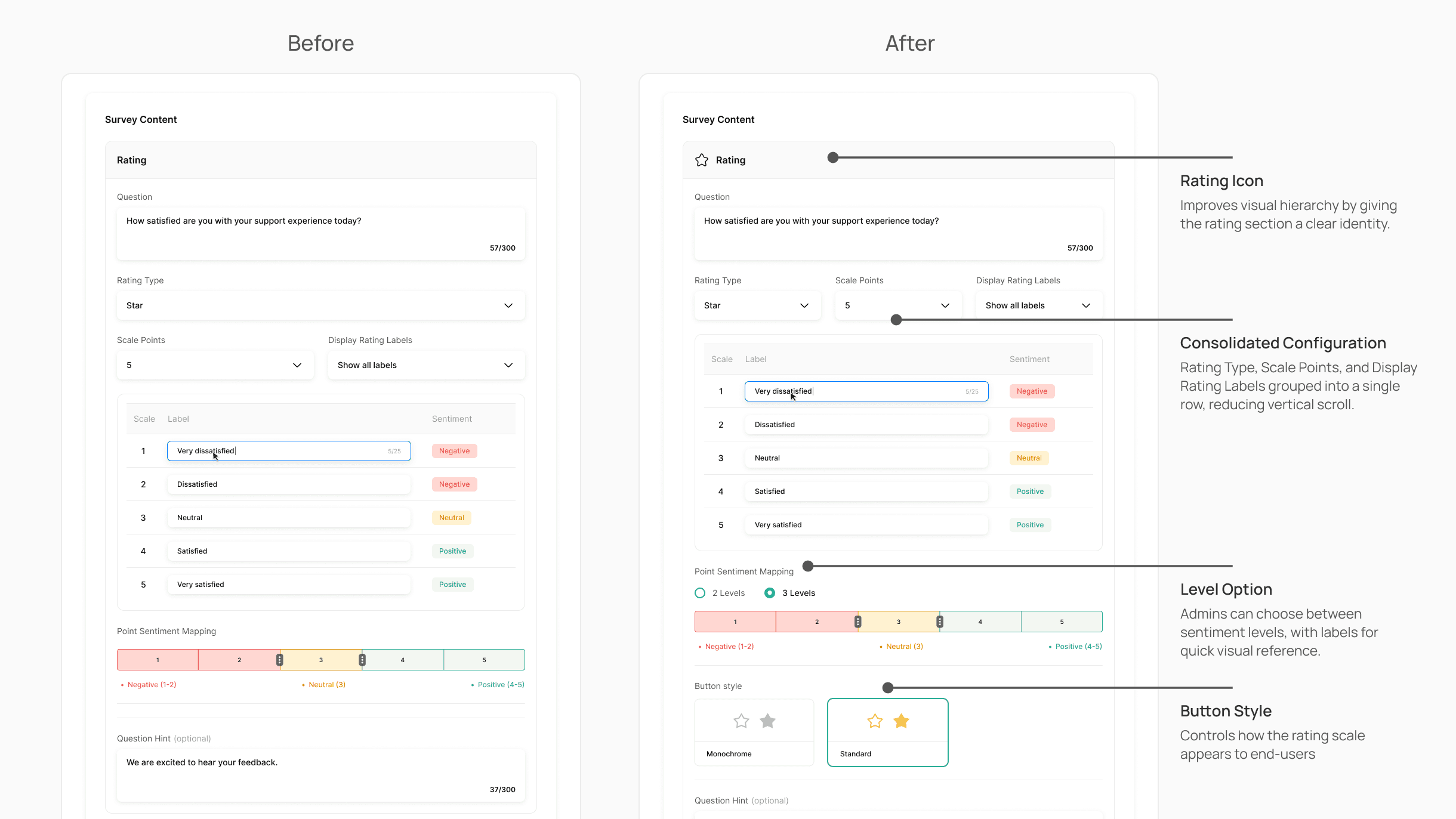
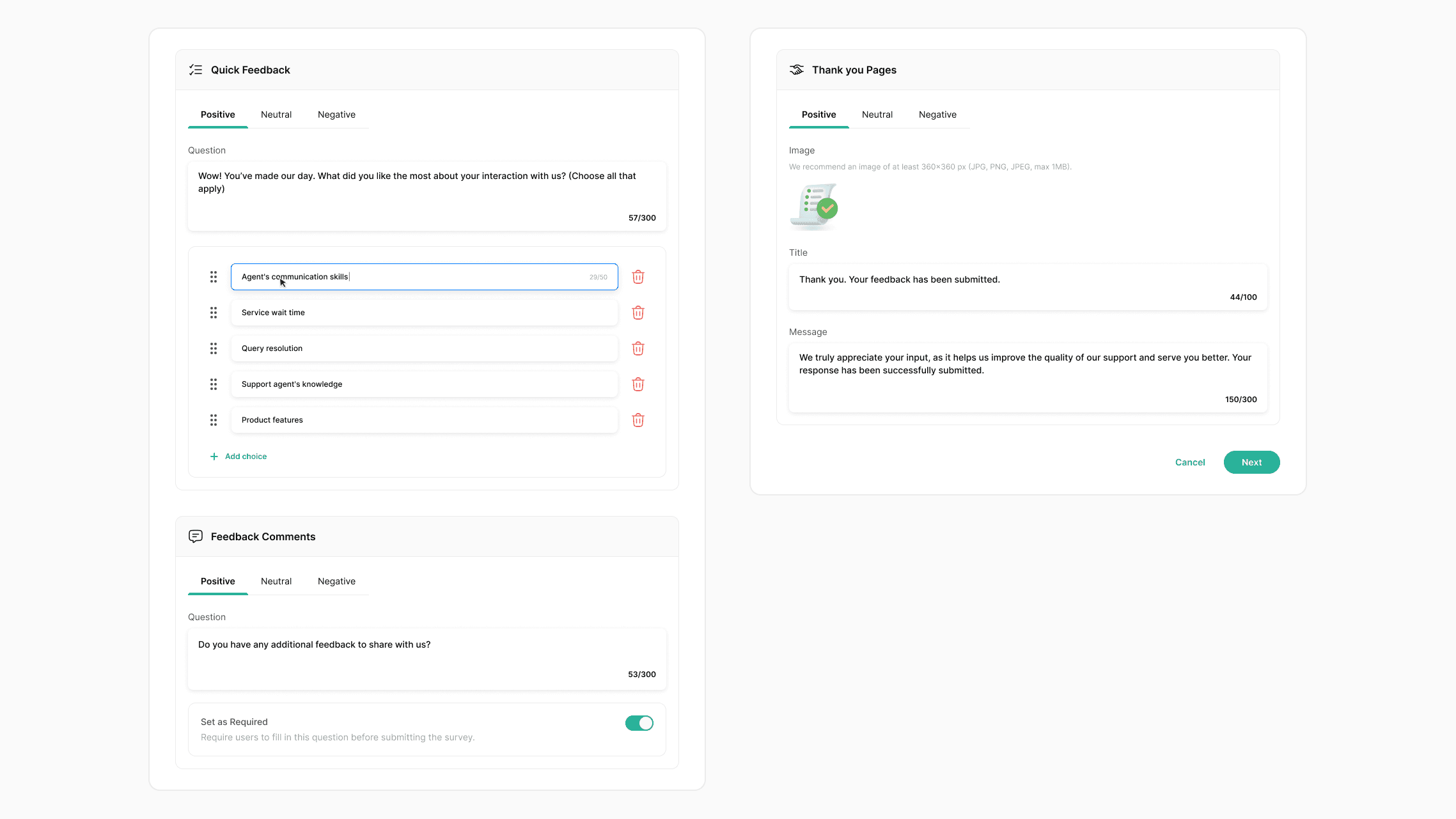
Moving into the core of the survey setup, where admins define the actual content of the survey. The initial version covered the essentials but left room for improvement in clarity and configurability.
After iteration, the layout was tightened, and the missing pieces were filled in. Each change was small, but collectively they make the setup feel more considered.
Moving into the core of the survey setup, where admins define the actual content of the survey. The initial version covered the essentials but left room for improvement in clarity and configurability.
After iteration, the layout was tightened, and the missing pieces were filled in. Each change was small, but collectively they make the setup feel more considered.
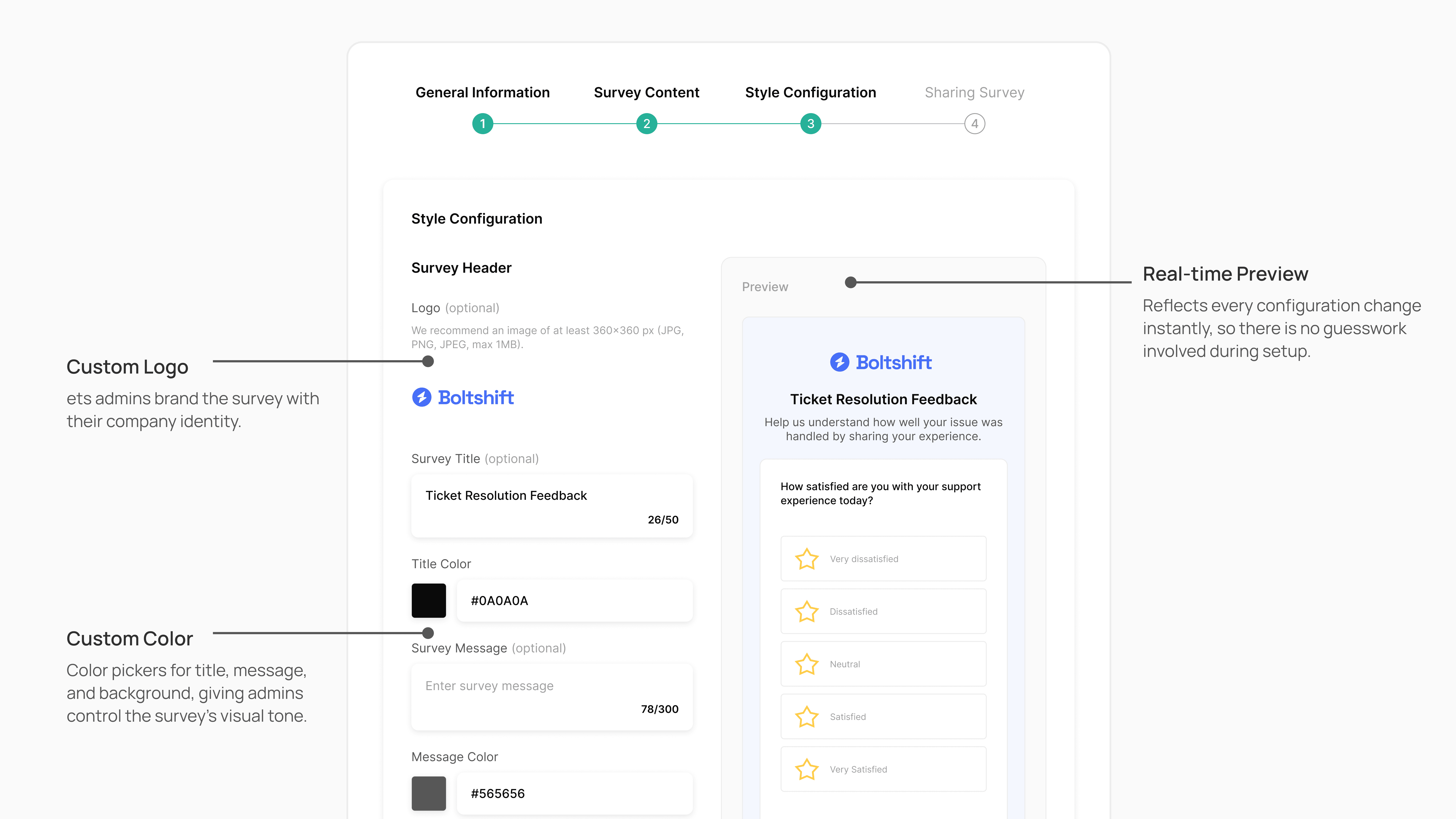
Step 3 is where the survey takes on the client's identity. Admins can upload a logo, adjust text, and background colors to match their brand. A live preview panel on the right reflects every change in real time, so there is no guesswork involved.
Step 3 is where the survey takes on the client's identity. Admins can upload a logo, adjust text, and background colors to match their brand. A live preview panel on the right reflects every change in real time, so there is no guesswork involved.
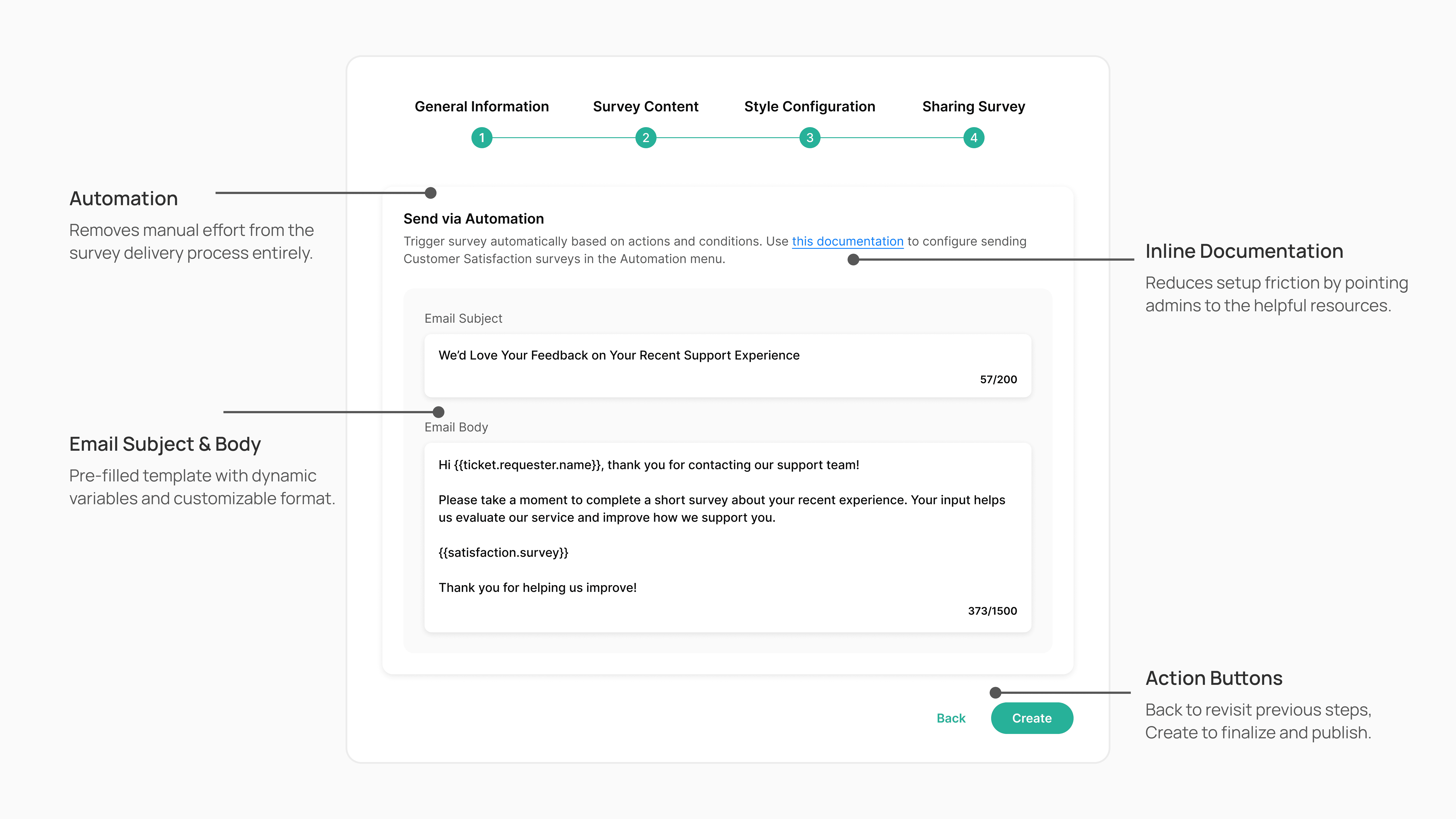
The final step is where the survey goes live. Admins configure the automation trigger and customize the email template, with dynamic variables pre-filled to keep setup quick without sacrificing personalization.
With all four steps completed, the CSAT survey is ready to collect feedback as soon as a ticket is resolved.
The final step is where the survey goes live. Admins configure the automation trigger and customize the email template, with dynamic variables pre-filled to keep setup quick without sacrificing personalization.
With all four steps completed, the CSAT survey is ready to collect feedback as soon as a ticket is resolved.
Survey Customization
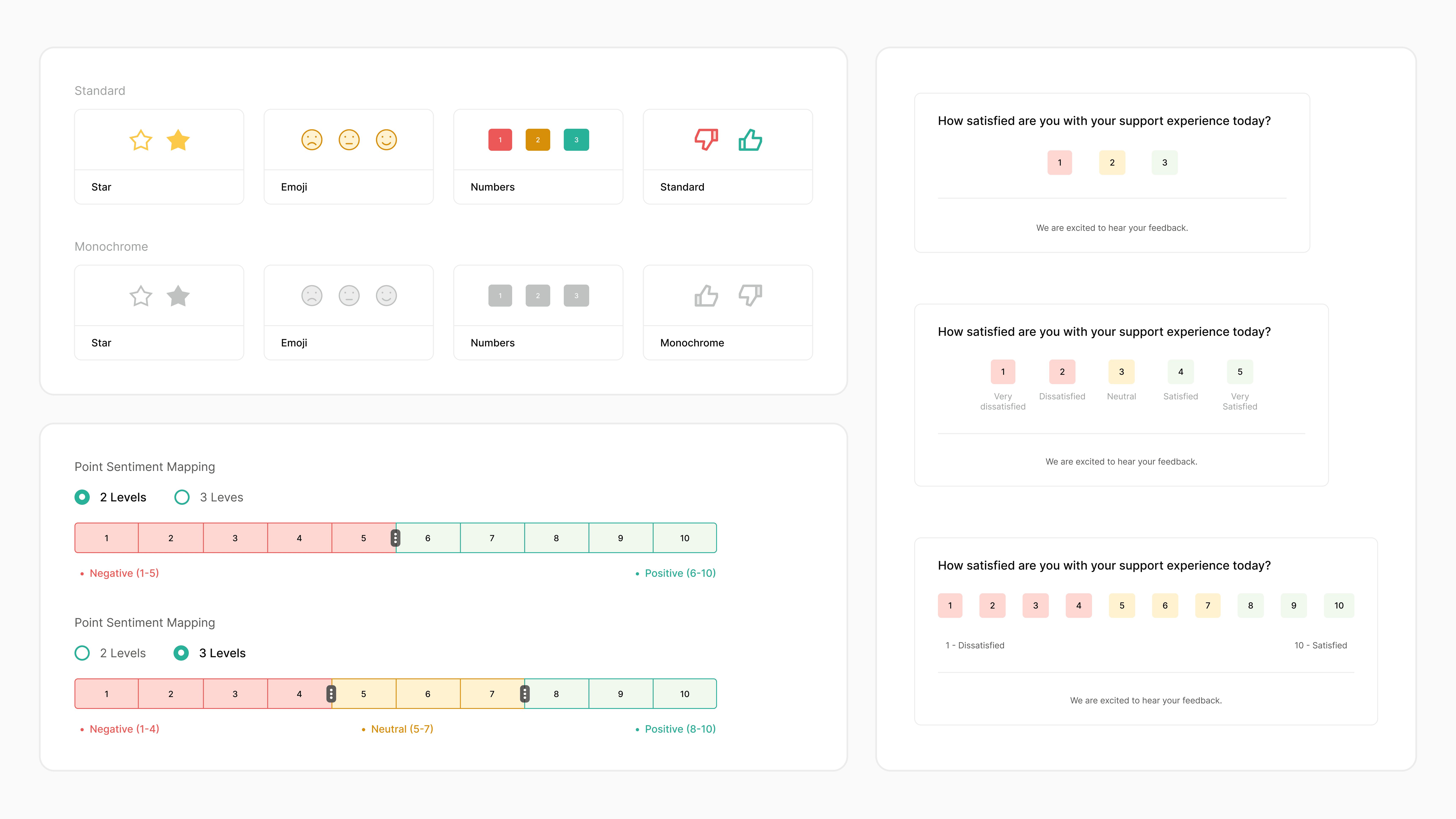
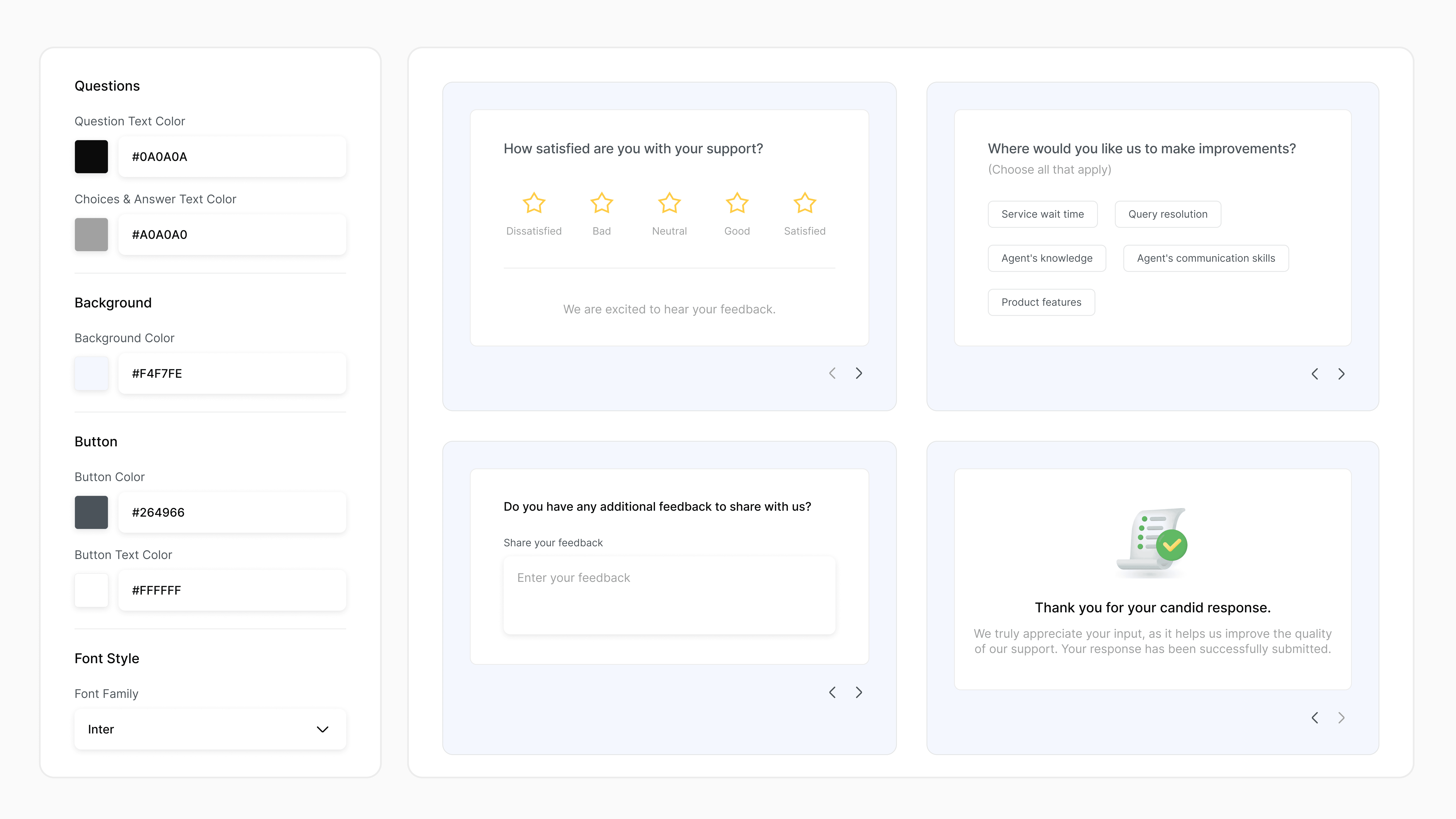
Every client has a different way of collecting feedback. The customization options are built to accommodate that. Admins can adjust the rating format and overall visual style to match their brand and audience.
The goal is simple: when a survey feels familiar and on-brand, end-users are more likely to engage and complete it.
Every client has a different way of collecting feedback. The customization options are built to accommodate that. Admins can adjust the rating format and overall visual style to match their brand and audience.
The goal is simple: when a survey feels familiar and on-brand, end-users are more likely to engage and complete it.
How It All Comes Together
With the full creation flow in place, support teams gain a direct line to customer sentiment after every ticket resolution. The structured feedback helps admins identify performance gaps, coach agents more effectively, and drive faster resolution.
With the full creation flow in place, support teams gain a direct line to customer sentiment after every ticket resolution. The structured feedback helps admins identify performance gaps, coach agents more effectively, and drive faster resolution.
What I've Learned
Starting design exploration before the PM finalized the PRD allowed me to identify potential challenges early and understand the underlying business process.
Understanding user intentions makes the design process more focused on what users actually need.
Organizing Figma design frames and sections with clear annotations and handoff notes accelerated the development process.
Starting design exploration before the PM finalized the PRD allowed me to identify potential challenges early and provide valuable input during requirement discussions.
Understanding user intentions makes the design process more focused on what users actually need.
Organizing Figma design frames and sections with clear annotations and handoff notes accelerated the development process.

Next Steps and Impact
During the testing phase, my role shifted to supporting design QA, reviewing the implementation, and flagging visual or interaction inconsistencies before release.
The CSAT feature launched smoothly, with zero critical bugs reported in the first month post-launch. Read detailed documentation here ↗
Deployed across diverse industries including retail, healthcare, and transportation. This feature became a key differentiator in 5+ new enterprise and international client acquisition opportunities.
Made possible by many, a huge shout-out to the team who made this project a success:
PM Lead - Aditya
Devs - Agung, Safira, Rifky
QA - Tiyas
The Qiscus Helpdesk CSAT feature is currently in development, with the engineering team working on the backend integration and frontend implementation before moving to QA testing.
My role has shifted to supporting the testing phase by conducting design QA, reviewing the implementation, and flagging any visual or interaction inconsistencies.
Made possible by many, a huge shout-out to the team who made this project a success:
PM - Aditya
Devs - Agung, Safira, Rifky
QA - Tiyas
During the testing phase, my role shifted to supporting design QA, reviewing the implementation, and flagging visual or interaction inconsistencies before release.
The CSAT feature launched smoothly, with zero critical bugs reported in the first month post-launch. Read detailed documentation here ↗
Deployed across diverse industries including retail, healthcare, and transportation. This feature became a key differentiator in 5+ new enterprise and international client acquisition opportunities.
Made possible by many, a huge shout-out to the team who made this project a success:
PM Lead - Aditya
Devs - Agung, Safira, Rifky
QA - Tiyas
Thank you for reading up to this point!
Thank you for reading up to this point!